DAY-1: Linux Internals — Understanding User Space, Kernel Space, System Calls, and /proc
👨💻 DevOps Architect @ Hippo Technik, LLC Passionate about bridging the gap between development and operations, I'm a dedicated DevOps Engineer at 6D Technology. With a strong belief in the power of automation, continuous integration, and continuous delivery, I thrive in optimizing software development pipelines for efficiency and reliability. 🚀 Exploring the DevOps Universe In my articles, I delve into the fascinating world of DevOps, where I share insights, best practices, and real-world experiences. From containerization and orchestration to CI/CD pipelines and infrastructure as code, I'm here to demystify the complex and empower fellow developers and ops enthusiasts. 📝 Blogging for Knowledge Sharing As a tech enthusiast and a lifelong learner, I'm committed to sharing knowledge. My articles aim to simplify complex concepts and provide practical tips that help teams and individuals streamline their software delivery processes. 🌐 Connect with Me Let's connect and explore the ever-evolving landscape of DevOps together. Feel free to reach out, comment, or share your thoughts on my articles. Together, we can foster a culture of collaboration and innovation in the DevOps community. 🔗 Social Links LinkedIn: https://www.linkedin.com/in/unnati-gupta-%F0%9F%87%AE%F0%9F%87%B3-a62563183/ GitHub: https://github.com/DevUnnati 📩 Contact Have questions or looking to collaborate? You can reach me at unnatigupta527@gmail.com Happy Learning!!
1. What Is the Linux Kernel?
The kernel is the core of the Linux operating system. It acts as the bridge between applications and the underlying hardware.
Although it is possible to run programs on a computer without a kernel, the presence of a kernel greatly simplifies the writing and use of other programs, and increases the power and flexibility available to programmers. The kernel does this by providing a software layer to manage the limited resources of a computer.
The Linux kernel executable typically resides at the pathname /boot/vmlinuz, or something similar. The derivation of this filename is historical. On early UNIX implementations, the kernel was called unix. Later UNIX implementations, which implemented virtual memory, renamed the kernel as vmunix. On Linux, the filename mirrors the system name, with the z replacing the final x to signify that the kernel is a compressed executable.
The kernel manages several important resources:
CPU and process scheduling: Decides which runnable tasks get CPU time.
Memory management: Manages virtual memory, physical memory, and memory protection.
File systems: Provides mechanisms to access files and directories.
Device management: Coordinates access to hardware through device drivers.
Networking: Implements core networking functionality.
Security and permissions: Enforces access controls and isolation.
Without the kernel, applications wouldn't have a standard, protected way to use system resources.
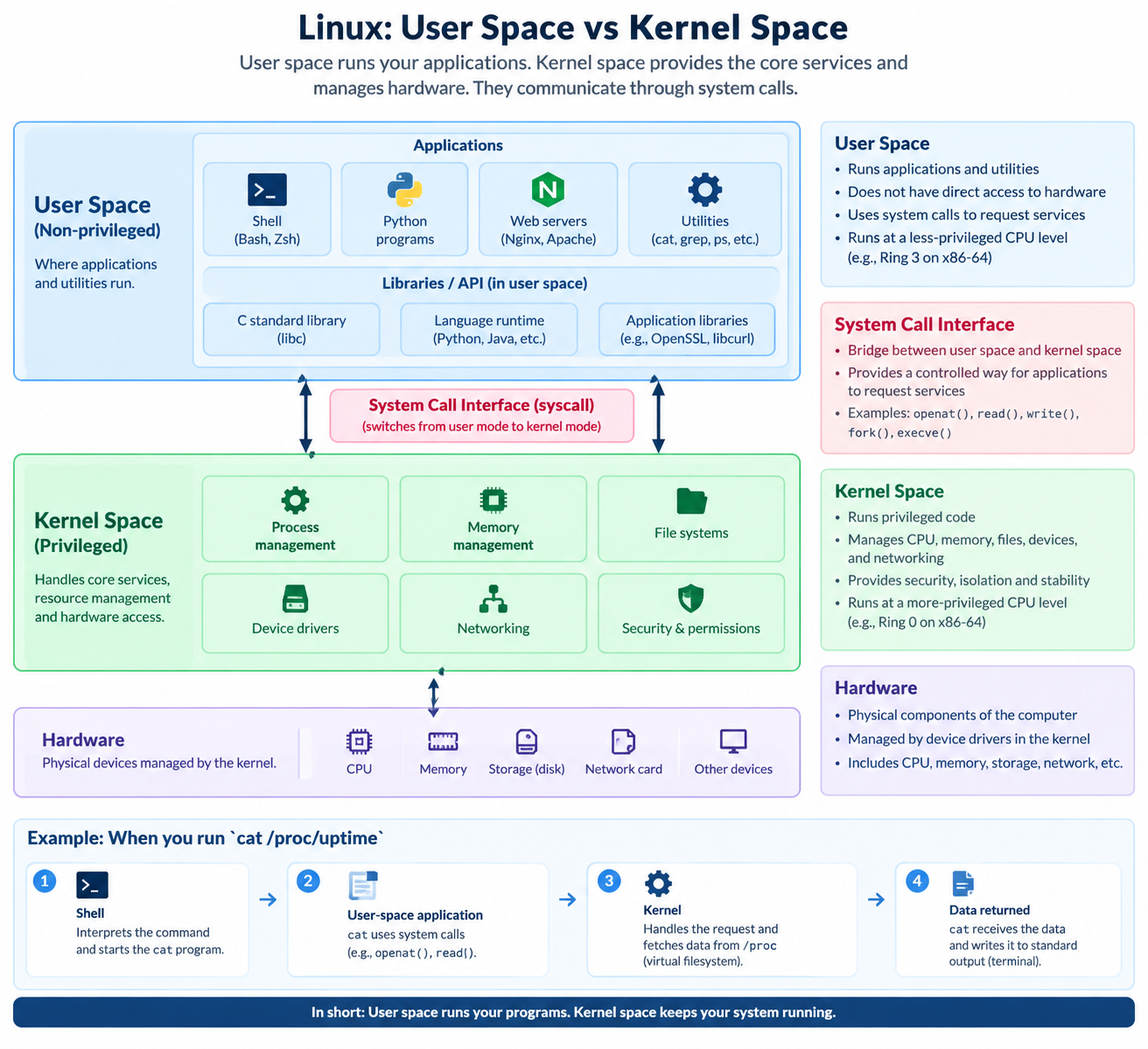
2. User Space vs. Kernel Space
Linux separates application execution from privileged kernel operations.
User space
User space is where ordinary applications run, including shells, editors, web servers, and command-line utilities.
Examples:
Bash
Python programs
NGINX
cat,ps, andgrep
Applications generally cannot directly perform privileged hardware operations. They request services from the kernel through controlled interfaces.
Kernel space
Kernel space is where the Linux kernel executes its privileged code.
It handles tasks such as process scheduling, memory management, file operations, and device access.
On typical x86-64 Linux systems, applications run at a less-privileged CPU level, while the kernel can execute at a more-privileged level.
Key takeaway: User space runs applications; kernel space provides protected access to system resources.
3. What Is a Shell?
A shell is a special-purpose program designed to read commands typed by a user and execute appropriate programs in response to those commands. Such a program is sometimes known as a command interpreter.
For example, when I type:
cat /proc/uptime
The shell interprets the command and starts cat. The cat program reads the requested data and writes it to the terminal.
Major Linux and Unix shells
The shell is not the kernel. It is an application running in user space.
| Shell | Full name | Key characteristics |
|---|---|---|
sh |
Bourne shell | Classic Unix shell; foundation for portable shell scripting |
csh |
C shell | Uses syntax inspired by the C programming language |
tcsh |
TENEX C shell | Enhanced C shell with command-line editing and completion |
ksh |
KornShell | Combines traditional Bourne-shell compatibility with features for interactive use and scripting |
bash |
Bourne Again SHell | Widely used on Linux; interactive features and scripting extensions |
zsh |
Z shell | Powerful interactive shell with extensive customization and completion |
fish |
Friendly Interactive SHell | User-friendly interactive shell with autosuggestions and syntax highlighting |
One important distinction: sh is a shell interface/name, not always a particular shell implementation. On different systems, /bin/sh may point to Bash, Dash, or another POSIX-compatible shell.
4. What Is a System Call?
A system call is a controlled interface through which a program requests a service from the kernel.
Examples include:
| System call | Purpose |
|---|---|
openat() |
Opens a file or obtains a file descriptor |
read() |
Reads data from a file descriptor |
write() |
Writes data to a file descriptor |
fork() |
Creates a child process |
execve() |
Executes a program in the calling process |
For example, when a program reads a file, it may use system calls such as openat() and read().
The exact sequence depends on the program and its libraries.
5. API Calls vs. System Calls
An API (Application Programming Interface) provides functions that software can use to interact with another component or library.
A system call is a specific interface for requesting a service from the operating system kernel.
Consider Python:
with open("/etc/hostname", "r") as file:
    print(file.read())
Here, open() is a Python API. Underneath, the Python runtime and its libraries use operating-system interfaces, which can ultimately involve system calls such as openat() and read().
So, an API call and a system call are not the same thing. An API may use one or more system calls, or it may not need a system call at all.
6. What Is /proc in Linux?
The /proc directory is a virtual filesystem that exposes information about running processes and the kernel.
Although its contents look like ordinary files, much of this information is generated dynamically by the kernel rather than read from regular files stored on disk.
Useful examples:
cat /proc/uptime
cat /proc/meminfo
cat /proc/loadavg
These commands help inspect:
/proc/uptime— system uptime and idle time./proc/meminfo— memory-related statistics./proc/loadavg— system load averages and process information.
We can also inspect details about a specific process:
cat /proc/self/status
/proc/self refers to the process accessing that path. In this example, that will normally be the cat process.
Key takeaway: /proc is a window into selected kernel and process information.
7. How Do These Components Work Together?
Let's use this command as an example:
cat /proc/uptime
The shell reads the command.
The shell launches the
catprogram.catrequests access to/proc/uptime.The program uses operating-system interfaces and system calls to obtain the data.
The kernel provides the data exposed by the virtual filesystem.
catwrites the output to standard output, which is normally the terminal.
This example connects the shell, user-space application, system calls, kernel, and /proc filesystem.
8. Practical Commands I Learned
I used these commands to begin exploring my Linux environment:
uname -a
cat /proc/version
cat /proc/meminfo
cat /proc/uptime
cat /proc/loadavg
uname -adisplays kernel and system information./proc/versionprovides information about the running kernel build./proc/meminfoexposes memory statistics./proc/uptimeshows uptime and idle time./proc/loadavgshows load averages and related process information.
These commands are useful starting points for understanding a Linux system without changing its configuration.
Conclusion
Today, I learned how Linux separates user-space applications from privileged kernel operations, how system calls provide access to kernel services, how APIs differ from system calls, and how /proc exposes live system information.
My biggest takeaway is that running a Linux command is only the visible part of a much larger process involving the shell, applications, system calls, and the kernel.
This is the beginning of my Linux internals learning journey. I'll continue with practical exercises and gradually explore process management, memory management, scheduling, storage, and performance troubleshooting.
Thank you for giving your precious time to read this blog/article, I hope it’s help you to setup monitoring system in your cluster. if any suggestions or improvements are required on my blogs feel free to connect on LinkedIn Unnati Gupta. Happy Learning 💥🙌**!!**
#Linux #LinuxInternals #DevOps #SRE #LearningInPublic